What is software development in 2026…
In the (far too recent) past, the practice of software engineering involved getting the specifications for a product, implementing those specs and iterating on the product as needs changed. With the advent of agentic development harnesses such as Claude Code, that world has changed. Many organizations have taken the approach of letting their engineers figure out how best to leverage those tools. This has led to fragmented approaches across development teams. This fragmentation comes with a hefty price. Token usage is not optimized, beneficial multipliers obtained from a common approach are lost, and lots of redundant investigation amongst devs is happening. As the new tools have entered our workflows, we’ve forgotten about the principles of software engineering that have served us for decades.
As I’ve thought about this problem, it’s become clear to me that a unified approach to development is required. As engineers, it is our desire to find the fastest, most unique ways to exploit the tools as quickly as possible. This is not that. Instead of describing what new skill file you should create or which CLAUDE.md practice you should use: I suggest we start by redefining the entire development cycle. Development cycles must vary between teams, but there is certainly a subset of common patterns that can apply to all teams. I’m not making a unique observation by saying software engineering in 2026 is about becoming the architects, maintainers and operators of software factories. We must walk before we run, so how do we apply this “factory” concept?
What Are The Properties of a Factory
- It runs on raw material.
- It configures itself to the product being built.
- It has a defined production line.
- It keeps records of the work it has done.
- It has quality-control gates.
- It detects and responds to defects.
- It separates production from inspection.
- It has humans at control points.
- It constantly improves.
Consider a company that makes a small plastic toy dog. They decide to build a second factory to create a small plastic toy cat. The new factory might not be exactly the same factory as the old one. We can expect it to be very similar. Software development is no different. Our agentic factory is the base template we will reuse and configure each time we create a factory to deliver new software product.
Basic Properties of Our Factory
The Factory Runs on Tokens
Our factory runs on tokens. Tokens are a limited and costly resource, so the factory should be designed to maximize the value we get from the token spend.
This does not mean minimizing token usage at all costs. It means using tokens intentionally, where they improve speed, quality, understanding, or delivery. Engineers should never be measured on token spend (high or low); they should be measured on the product the factory delivers.
We Own What the Factory Produces
That means we own the quality of the code. More importantly, we own the quality of the product delivered to customers. AI-generated work is not exempt from engineering standards, review, testing, maintainability, or product responsibility.
Documentation Becomes More Important
The value of documentation increases when we are writing less of the code manually.
The agent needs context to operate effectively. Future engineers need context to understand what was built. Good documentation improves both the output of the factory and our ability to maintain that output after it is produced.
Claude Code is Just One Component of the Factory
It is not the entire factory, and the entire factory does not live inside Claude Code.
The factory includes our repositories, documentation, plans, prompts, tests, review processes, CI/CD systems, human judgment, and team standards.
The Factory Works Best When Used Consistently
Some parts of the factory, such as generated documentation, shared conventions, reusable prompts, review patterns, and planning artifacts, only become valuable if we use them consistently across the team.
The Factory Can Be Extended
You can add to the factory.
Factory additions may be local to your machine, workflow, or repository. If an addition proves useful, please communicate it so the team can decide whether it should become part of the shared factory.
The Factory Will Change Quickly
Claude Code may change. AI tools may change. Our repositories may change. Our team may change. Our processes may change.
The factory must be able to adapt quickly without losing its core purpose: producing high-quality software in a repeatable, inspectable, and improvable way.
The Factory Loop
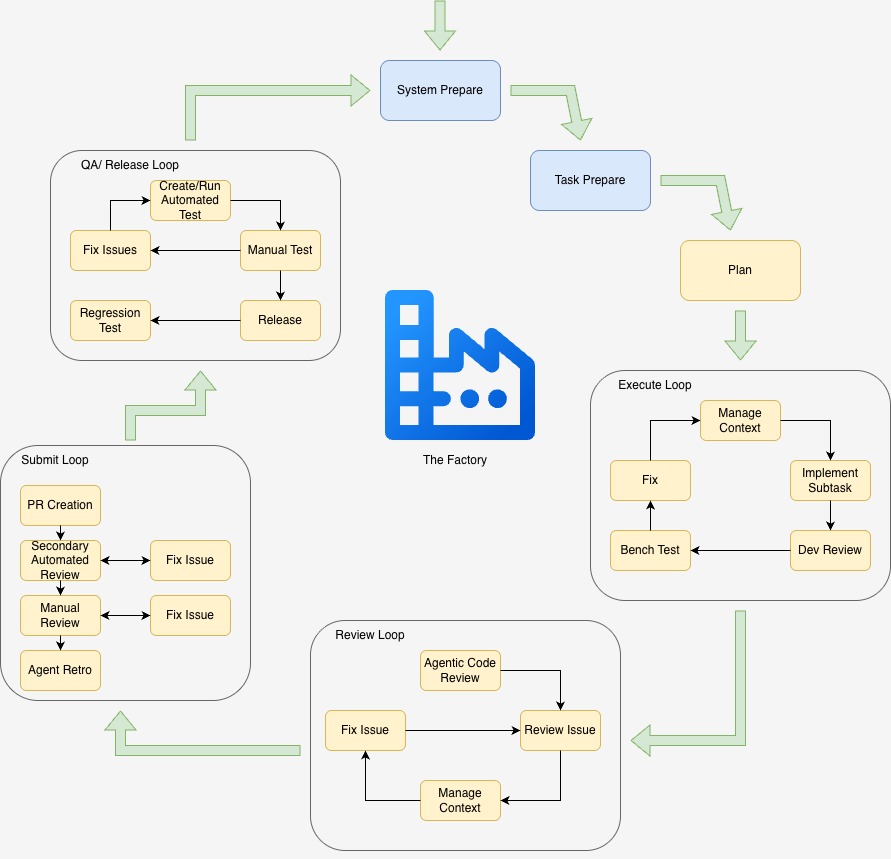
This section will assume we are using Claude Code. Other agent harnesses fit into this just as well.
The factory executes in a loop. It defines how we prepare, plan, review, submit, and QA each task we run through the factory. Here, a task is defined as a piece of product large enough to release to production. It may contain many subtasks. If we are thinking about Claude Code, a task is something big enough that we are going to run plan mode on it.
System Prepare
Every machine in your organization running the factory must have common elements needed to support the factory. These could be software items (Claude Code, for example), additional plugins and tools, processes, etc. This should all be documented in a known location (or better yet, scripted to auto-install).
Some recommendations on defining this step:
- Define the common software required by your team.
- Recommend “Quality of Life” extensions for Claude Code.
- Is there a recommendation for the format of the status bar?
- What are common elements of the home directory CLAUDE.md everyone should use?
- Is there a security setup to prevent Claude Code from doing certain unsafe actions?
- What hooks and skills are useful enough to be recommended always for everyone on the team?
- Are there things we can do to make searching through dependencies faster and cheaper? Define them in this step.
- How do we handle workspace management?
Understand Your Requirements
Before defining your system prepare step, it is essential to understand your requirements and limitations. If your organization is limited on token spend, you may want to compromise speed and model accuracy to optimize for cost (or at least be certain everyone knows how to save tokens). If you are token-maxing, you don’t care about spend (you will not be reading this anyway). As those core requirements and limitations change, so will your system prepare step. It’s easy to research how to optimize Claude Code. It’s harder to figure out how to optimize it for what you care about. We need to optimize not just Claude Code, but the entire factory.
Workspace Management
Workspace management can be useful for systems with lots of repos and/or microservices. Most people will store those in a common folder. My favorite pattern is to run Claude Code in the repo I’m working on, but to keep a CLAUDE.md in my workspace folder that maps what each repo is called, where it is located, and what it does (at least for the important ones). This makes it easy to direct Claude Code to go searching through repos for information on dependencies.
Not A One-Time Step
You will notice that I put this as the entry point into the factory loop, not outside it. This is the step where you should analyze the factory to determine if you should tweak it. With AI, nothing is deterministic and things change fast. You should be constantly re-evaluating goals and re-evaluating whether or not the factory achieves them.
Task Prepare
Task preparation generally includes how you set up your repo and how you begin the process of agentic development in Claude Code. This step also features the most important prompt of the loop, because each execution loop that follows will be based on this plan.
Repo-level CLAUDE.md and Plan Management
What elements should every repo-level CLAUDE.md include? This CLAUDE.md should be written or tweaked in this step. As a project changes, it is a good idea to visit this often to be sure it stays up to date. This is also where I like to add plan file management.
I like to add a section to this CLAUDE.md (for most repos, which is why I put it in the repo-level CLAUDE.md) that tells Claude how to create a plan file for every ticket (Jira or otherwise) being worked on. This instruction tells Claude how to name the file (I use the Jira ticket, a date, and a short description), and to store it in a plans folder. It instructs Claude to keep the file up to date as we implement subtasks that change the original plan. This is useful for both documentation and context management. If the plan file is always up to date, I am free to clear my context confidently because the plan file is always there with the essential information about what we are implementing. It creates fantastic documentation to understand what happened when a ticket was implemented. You can even feed the old plan into Claude to give it context in the future if necessary.
Much has been written about how to create a good CLAUDE.md. I won’t cover those details here, other than to mention that it is the core of your context. It gets written into the context each time. Its brevity and accuracy are vital.
The Model and Effort
It is important to establish what model and effort you want to use. The quality of the planning session will have a big influence on how the rest of the implementation goes. For me, it’s the place I spend the tokens on Opus. I will drop to Sonnet for implementation. I use the recommended effort levels (usually high, but it’s changed over time per model).
The Prompt
For planning, you really should be giving Claude Code the specification of what you are trying to develop. We are clearly going to a place where spec-based agentic harnesses will automatically pull in the specs to start. If you are still doing this manually, it can be good to create the prompt in a different editor and not in the Claude Code CLI. I write a short document (and paste it into the CLI when finished) that includes things like:
- What do we need to accomplish?
- What are the constraints?
- Are there areas we just want to scaffold or do we want to implement everything now?
- What are the testing expectations? How do we prove we got it right?
- Are other repos involved? Do I need to tell Claude where to find background information it may need?
Execute Loop
When we execute, we enter a sub-loop. While the default behavior is to tell Claude to implement the entire plan after it is generated, I often find it useful to break implementation into smaller subtasks. This reduces my cognitive load when reviewing Claude’s work and gives me opportunities to bench test changes locally as I go.
The right approach depends on the task. If the work is small and well-defined, I have no problem letting Claude implement it all at once, which effectively means I only make a single pass through the execution loop. As mentioned earlier, this is also where I typically switch to Sonnet.
The first step is context management. Because we maintain a plan file throughout the process, I will often clear or compact the conversation context before starting the next subtask. Having context usage visible in my status bar helps me decide when to do this. The idea is simple: if the context window is full of details from previous subtasks, I can flush that information and have Claude Code reload the necessary context from the plan file. This maximizes the amount of context available for the current task and theoretically reduces token spend. It is difficult to prove that this consistently produces better outcomes because nothing about LLM behavior is fully deterministic. That said, I have had good results with this approach.
Now that I’ve prepared the context, I prompt Claude to implementation the subtask, including unit tests.
When implementation is complete, I review the change in a diff tool. I’ve found VS Code to be my favorite option. If I see something I don’t like, I either change it myself or ask Claude Code about it.
Next is the bench test. I run the change and verify it behaves as expected. If it doesn’t, either Claude Code or I fix the issue and repeat the process.
After that, it’s on to the next subtask or on to the review loop. As important as implementation is, the execution loop is intentionally simple. Most of the thinking has already been done during planning. The goal here is simply to execute, verify, and iterate until the plan is complete.
Review Loop
The review loop is a sub-loop we run when execution is complete. The idea is that we perform a code review in Claude Code prior to opening a PR. The loop is fairly simple. We start by running an agentic code review. We only need to do this once. When that is complete, we review each issue. If desired, we can compact or clear the context and then fix the issue. Once the current issue is fixed, we move on to the next issue until all issues are skipped or fixed.
Code Review Skill
I highly recommend finding a multi-agent code review skill. There are many solutions for this, and it isn’t hard to write your own to customize it. The one I use is a custom four agent review tool. The first agent looks for correctness. The second focuses on security. The third focuses on concurrency. The final subagent reviews testability and maintainability. It creates an MD file that lists each error, categorizes it by severity and confidence, and suggests a fix. I run the tool and then open the MD file and fix the issues, one at a time. The tool is very thorough and somewhat expensive to run, even under Sonnet. I’ve deemed the time and token spend to be worth it because it does a great job at catching issues before they reach other team members, testers, or even customers. I get a very detailed review before the PR is even created.
Submit Loop
The submit sub-loop is the last barrier before the code is allowed to be committed and merged. We start by creating a PR. Assuming you are using GitHub, it can be good to run it through a CoPilot review if available. It adds a second review of your code separate from the big multi-agent review executed in the Review Loop. Overall, I think it is an optional step that has benefits if you can afford it. I fix the issues it finds and then request a manual review. If that results in issues, I fix those as well. Once approved, we merge to master/main. This is also the time I perform the retrospective.
Retrospective System
Retrospectives are a tricky thing in Claude Code because of the way it manages context. As part of constantly improving my factory, I want Claude’s opinion on what went well and what went poorly during a session. I have a system set up for this. It uses a hook to store a journal of every meaningful Claude Code “turn”. It is based on the Jira ticket, so it can span multiple sessions and context clears. A retro command is provided, which, when run, uses Haiku to create an MD file that tells you what went wrong, what could have been better, and suggestions on how to improve accuracy and cost. We use Haiku because we want this to be inexpensive. Each time I run the retro I look for tweaks I can make to improve my factory. The retro has gotten me to update my skill files, change the way I manage context, and alter my CLAUDE.md files. Note that this is different from a traditional Agile-style retro. It is looking at the Claude Code process and not the entire task.
QA/Release Loop
Finally, we are ready for a QA cycle. We start by creating and/or running automated tests. We follow that with manual testing and a cycle to fix any issues that may arise. As we finish looping through issue fixing we come to the point where we release the code to production, regression test, and let the user have at it. This completes a pass through the loop.
Conclusion
Those well ensconced in the world of AI may take a look at this and deem it outdated or rudimentary. Many organizations are still struggling with these basics. Consider the idea of building, saving, and checking in a plan file for each ticket. If every engineer on a team generates those plan files, your documentation base grows and becomes consistent. If we all review code in the same way, it improves our confidence in the code AI is producing. This baseline confidence allows us to automate more of the things. The multiplier effect then becomes apparent. We start delivering faster, better code. There are no revelations here. That said, what is presented here is a plan. Like anything in software engineering, the better your plan, the better your results.
Photo taken at the top of 401 Trail, Crested Butte Colorado